Akollo vs ClickUp
Akollo vs ClickUp: when to choose which
Both put a lot of work into one app. ClickUp leans on docs, chat and whiteboards; Akollo leans on what the work costs: hours, people, budgets and approvals, on your own servers if you need it.
At a glance
Akollo and ClickUp, area by area
- Built in
- Paid add-on, price in the cell
- Not offered
| Area | Akollo | ClickUp |
|---|---|---|
| Projects, boards and timelines | Built inBoards, backlogs, sprints, timeline and approvals. | Built inList, board, Gantt and timeline views. |
| Time tracking and timesheets | Built inTimesheets with approval, plus a desktop app that measures time. | Built inBuilt in; timesheet approvals are limited by plan. |
| Resource and capacity planning | Built inPlanned against available time, per team and period. | Built inWorkload view with capacity per person. |
| Budgets and profitability | Built inBudgets, cost rates, budget vs actual and profitability. | Not offeredBillable time and dashboard cards; no budget or cost-rate module found. |
| HR basics: people and time off | Built inEmployee records, org chart, leave requests and approvals. | Not offeredPersonal time off shows in plans; no leave approvals or employee records found. |
| CRM: accounts and pipeline | Built inAccounts, contacts, pipeline and activities. | Built inClickUp CRM: contacts, companies and deals. |
| AI assistant | Built inAdmins decide who uses it; it answers within each person's permissions. | Paid add-on, price in the cellClickUp Brain and agents are paid add-ons. |
| Self-hosting on your own servers | Built inOur cloud, or your own data centre or cloud account. | Not offeredHosted entirely on AWS. |
| Product in Turkish | Built inTurkish, English and German, written natively. | Not offeredNot among the interface languages. |
| Choice of where data is stored | Built inSelf-hosted, the data stays where you install it. | Built inUS, EU, Singapore or Australia, on Enterprise. |
Where Akollo is different
One record from the hour to the invoice
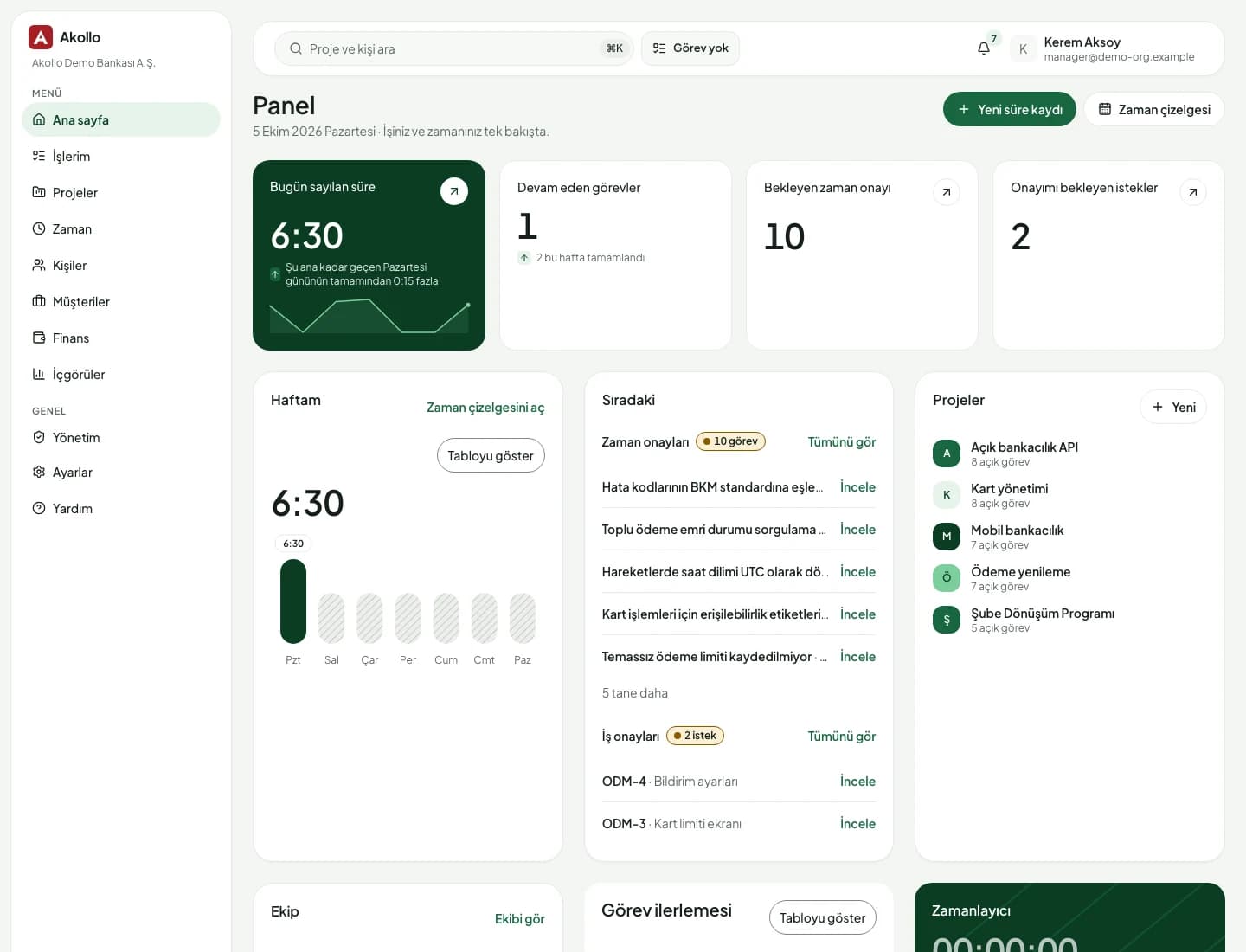
ClickUp can track time and show workload. Akollo goes further down the same road, into the questions finance and HR ask at month end.
- 01
Approved hours turn into cost on their own
A logged hour is approved by the manager, priced with the person's cost rate and lands in the project budget. Budget against actual and profitability come from the same record, so there is no spreadsheet in between.
- 02
Leave and capacity live next to the plan
People, the org chart, leave requests and approvals are part of Akollo. When someone books two weeks off, the team's capacity drops in the same product you plan in.
- 03
AI that respects who may see what
Admins choose who can use the assistant and set monthly limits. It answers within each person's own permissions, so a question never reaches data the person could not open.
- 04
Your servers, your language
Run Akollo in our cloud or in your own data centre or cloud account. Every screen is written in Turkish, English and German, not machine-translated.
To be fair
When ClickUp is the better fit
ClickUp covers a very wide range of everyday collaboration. If that breadth matters more to you than timesheets, cost and HR, it is a good choice.
- Your team writes docs, chats and draws on whiteboards next to tasks every day
- You want a CRM and project boards in one app without HR or finance in the picture
- You prefer to pick between AI models from OpenAI, Anthropic and Google inside the tool
Moving over
Move from ClickUp without losing the thread
ClickUp exports List and Table views to CSV. Akollo imports a CSV of up to 5,000 rows per file and shows a dry run before anything is written.
- 01
Export from ClickUp
Export your projects and tasks from ClickUp as a CSV file.
- 02
Map the columns
In Akollo, match each column to a work item field. A key column updates items you imported before.
- 03
Dry run first
See how many items would be created, updated or skipped before anything is written.
- 04
Move team by team
Start with one team, add timesheets and capacity, then bring the rest across.
Questions about ClickUp and Akollo
Is Akollo a ClickUp alternative?
For teams that need projects together with timesheets, capacity, budgets and HR basics, yes. If you mainly need docs, chat and whiteboards around tasks, ClickUp covers that well.
Can we import our ClickUp tasks?
Yes. Export a List or Table view from ClickUp as CSV, map the columns to Akollo fields and check the dry run before you import.
Does Akollo track time like ClickUp?
Yes, and more: people log time on tasks, managers approve timesheets, and an optional desktop app measures time on the computer. Approved hours feed cost and budgets.
Time and timesheetsCan Akollo run on our own servers?
Yes. Akollo runs in our cloud or in your own data centre or cloud account. ClickUp says it is hosted entirely on AWS.
See your ClickUp work in Akollo
Bring a CSV export to the demo and we will show it with timesheets, capacity and budgets around it.