Skip to content

Projects & tasks

Project status as a fact, not a meeting

Boards, backlogs, sprints and timelines for every team, with hours, people and budgets already attached. Managers read progress from the work itself instead of asking for it.

Customer portal relaunchW1–W9
  • Discovery
  • Design
  • API
  • Web app
  • QA and release
  • 01

    Every way of working

    Kanban boards, Scrum sprints, a plain list or a timeline, chosen per project, without separate tools.

  • 02

    Hours on every task

    Time logged against a task rolls up to the project, the client and the budget on its own.

  • 03

    Capacity you can trust

    Assign work against real availability, including leave and part-time schedules from HR.

  • 04

    Runs where you need it

    In your own data centre or in our cloud, with roles, audit log and single sign-on.

Boards and backlogs

One board for teams, one view for managers

Teams move cards through their own workflow; managers see the same work grouped by project, priority or owner. Nobody keeps a second spreadsheet to explain the first one.

  • Custom statuses, priorities and fields per project
  • Backlog grooming, sprints and story points
  • Saved filters such as “My work” and “Overdue”
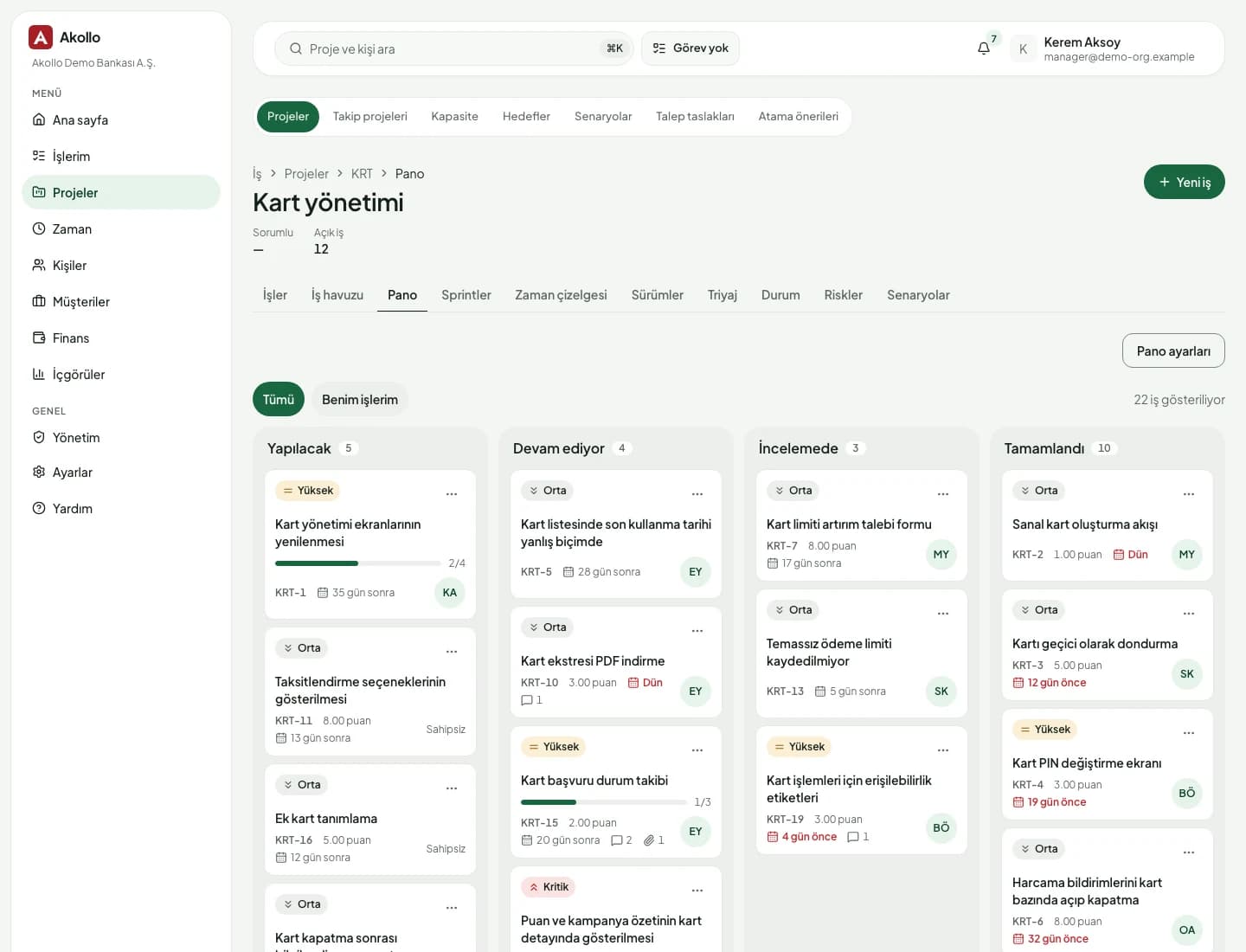
Akollo board view of a card management project with tasks grouped by status

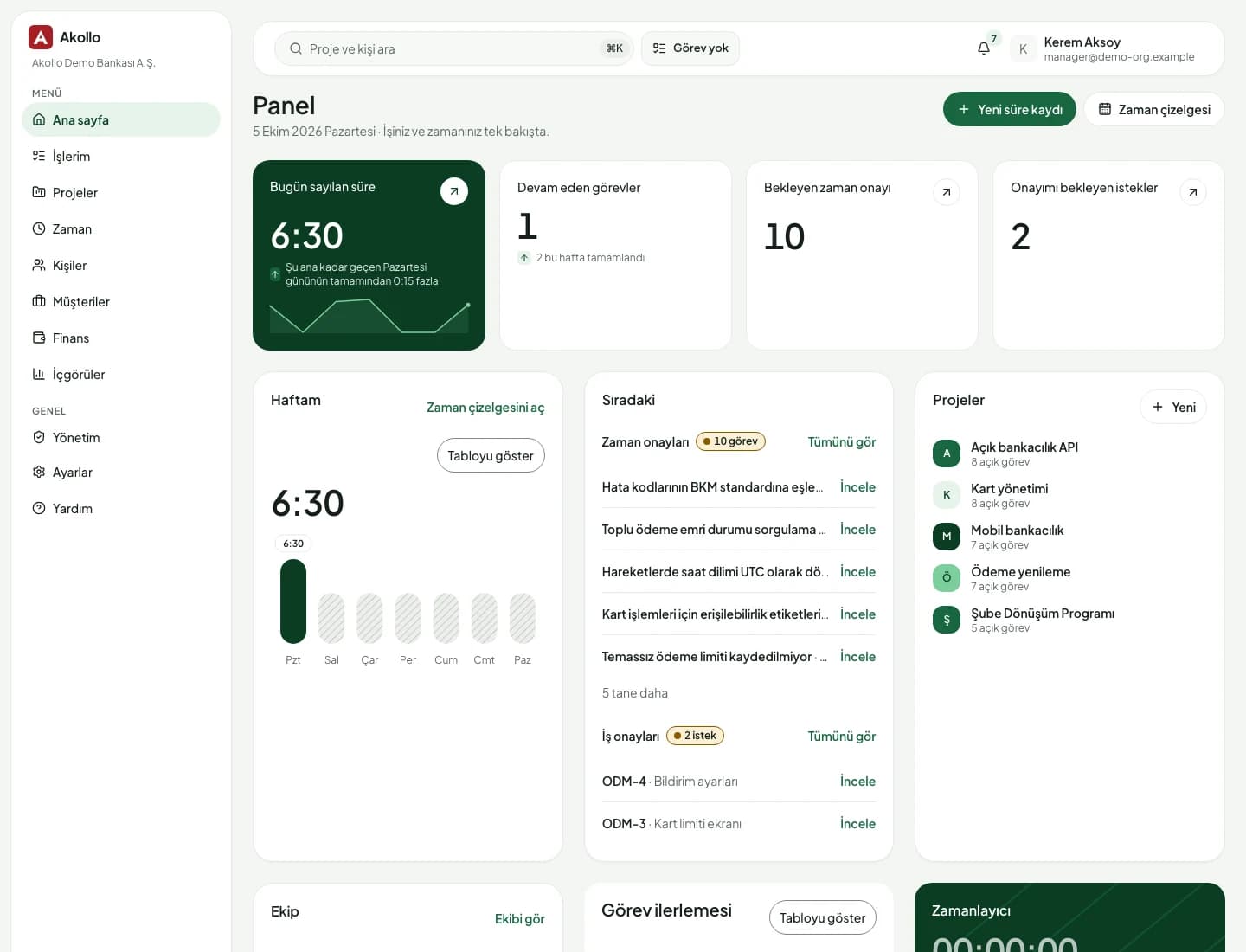
Home dashboard

Start the day with what needs you

Each person opens Akollo to their own panel: hours counted today, tasks in progress, approvals waiting and the projects they belong to.

  • Today's tracked time and this week at a glance
  • Approval queue for timesheets and requests
  • Recent projects with open task counts
Akollo home dashboard with today's tracked time, open tasks, pending approvals, weekly hours and projects

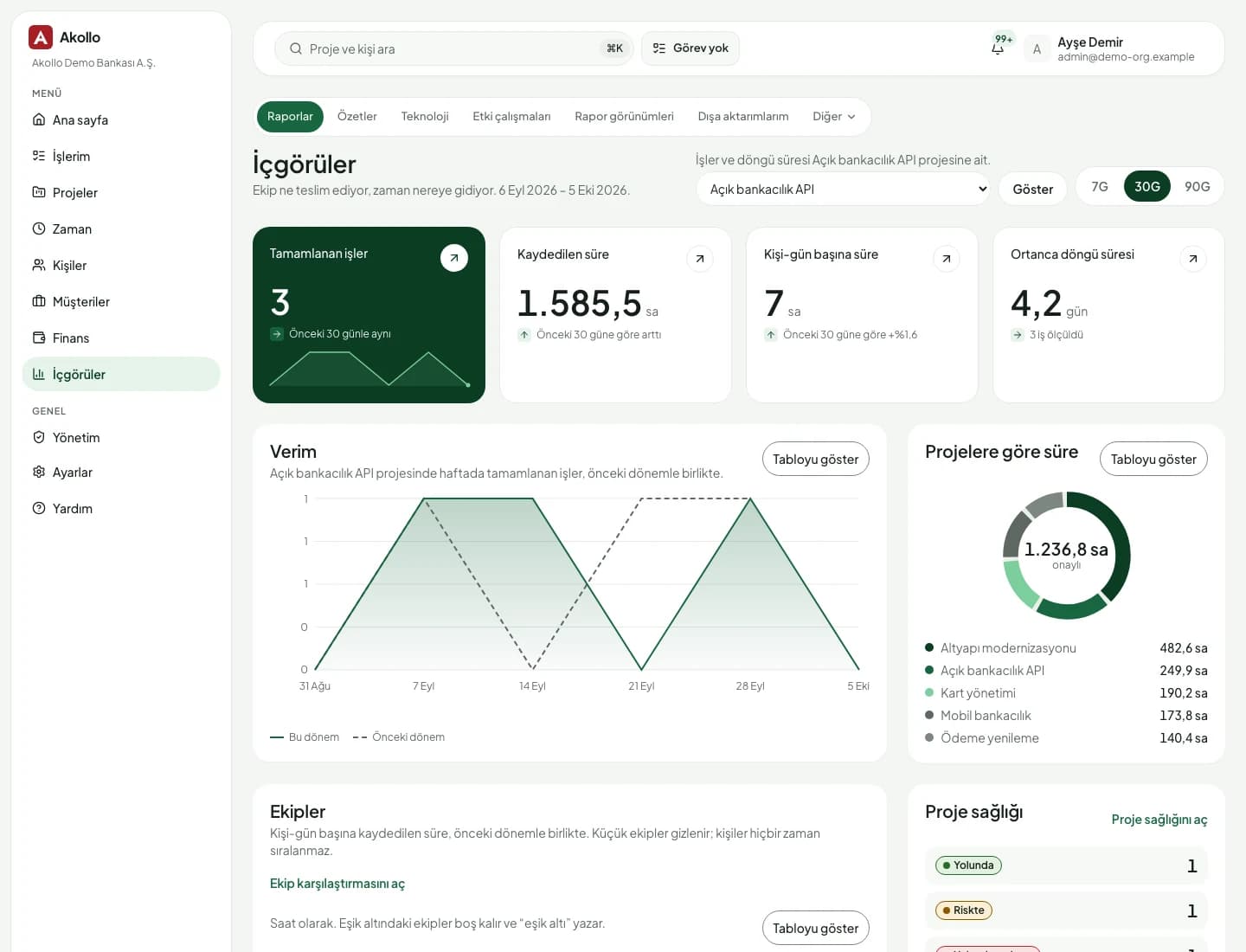
Portfolio insight

Portfolio reviews without anyone preparing slides

Throughput, cycle time and hours by project come from the same records your teams update every day. Leadership reviews the portfolio without asking anyone to prepare slides.

  • Completed work and cycle time per period
  • Hours by project, with approved and pending split
  • Project health: on track, at risk, off track
Akollo insights page with completed tasks, logged hours, a throughput chart and hours by project

Everything a project needs, in one place

The parts that usually live in four different tools, and never quite agree with each other.

  • Boards, lists and timelines

    Switch views without losing filters. Drag work between columns or across dates.

  • Sprints and releases

    Plan sprints, track velocity and group finished work into releases.

  • Risks and dependencies

    Keep a risk register next to the plan and see what blocks what.

  • Timesheets built in

    Log time on the task itself; approvals follow your organisation's rules.

  • Budgets and cost

    Compare planned and actual hours and cost per project and per client.

  • AI that knows the project

    Summaries, draft tasks and staffing suggestions from Akollo AI, on models you choose.

  • Import from Jira

    Bring projects, issues and history across, then retire the old tool at your own pace.

  • Turkish and English

    Every screen, notification and export in both languages, per user.

AI on this module

Ask about any project you can open

On a project page the assistant knows where you are. Type / for a command or # to name a project.

It reads only what you can open, and every change waits for your confirmation.

How the modules connect

Where projects meet the rest of Akollo

Every task carries the hours tracked against it, the people assigned to it and the budget it draws from, so progress, cost and staffing are read from the same records.

  1. 01PlanYou are here

    Turn goals into projects, backlogs, sprints and timelines.

    • Projects & tasks
  2. 02Staff

    Pick people by skills, availability and leave.

  3. 03Track

    Record time by hand or with the desktop app, on the right task.

  4. 04Bill

    See cost, budget, billing and margin per project and client.

  5. 05Improve

    Read what happened and plan the next round better.

The AI assistant works across every step, with your permissions and only after you confirm. AI assistant

Deployment and security

Runs where your data has to stay

The same Akollo in our cloud, in your own cloud or on your own servers.

  • Cloud or your own servers

    Choose where Akollo runs. Every module works the same way in each setup.

  • Your own AI model

    Point the assistant at a local model inside your network or at your own provider.

  • Scope in every view

    Managers see only the people in their scope, in every screen, report and export.

  • Audit records and four eyes

    Privilege and configuration changes are recorded, and sensitive ones wait for a second person.

Questions about Projects & tasks

Can each team keep its own way of working?

Yes. Every project chooses its own workflow, statuses and fields, and can use Kanban, Scrum or a simple list. Portfolio views still roll everything up in one place.

Can we move our projects over from Jira?

Yes. Akollo imports projects, issues, comments and history from Jira, so you can run both side by side for a while and switch team by team. Akollo vs Jira sets out where each one fits.

Is time tracking a separate product?

No. Hours are logged on tasks inside the same product, and they flow into timesheets, approvals, budgets and reports without any integration to maintain. Time & timesheets covers the details.

Can we install Akollo in our own data centre?

Yes. Akollo runs on-premise or in the cloud with the same features. On-premise installations keep all project data inside your network.

See your own projects in Akollo

We set up a demo with your workflow and your terminology, in English or Turkish.