Skip to content

Reports & dashboards

Numbers from the work, not a slide deck

Throughput, hours and project health are read from the same records your teams update every day. Every figure respects the reader's scope, and every export can be traced.

hours this week

32:45

  1. Mon 7:30 h
  2. Tue 8:00 h
  3. Wed 6:45 h
  4. Thu 7:00 h
  5. 3:30
    Fri 3:30 h
  6. Sat —
  7. Sun —
  • 01

    One source of truth

    Projects, hours and people share one data model, so totals agree across every view.

  • 02

    Scope in every figure

    Readers see only the people and projects they are allowed to see, in charts, reports and files.

  • 03

    Corrections shown beside the originals

    Time reports show corrected figures next to the originals, never in place of them.

  • 04

    Open to your BI

    Agreed datasets for Power BI, Tableau, Looker Studio or your own scripts, read-only.

Insights

The portfolio at a glance

Completed work, cycle time and logged hours by project, with approved and pending hours split. Leadership reviews delivery without asking anyone to prepare a report first.

  • Throughput per period
  • Hours by project, approved and pending
  • Project health from published status updates
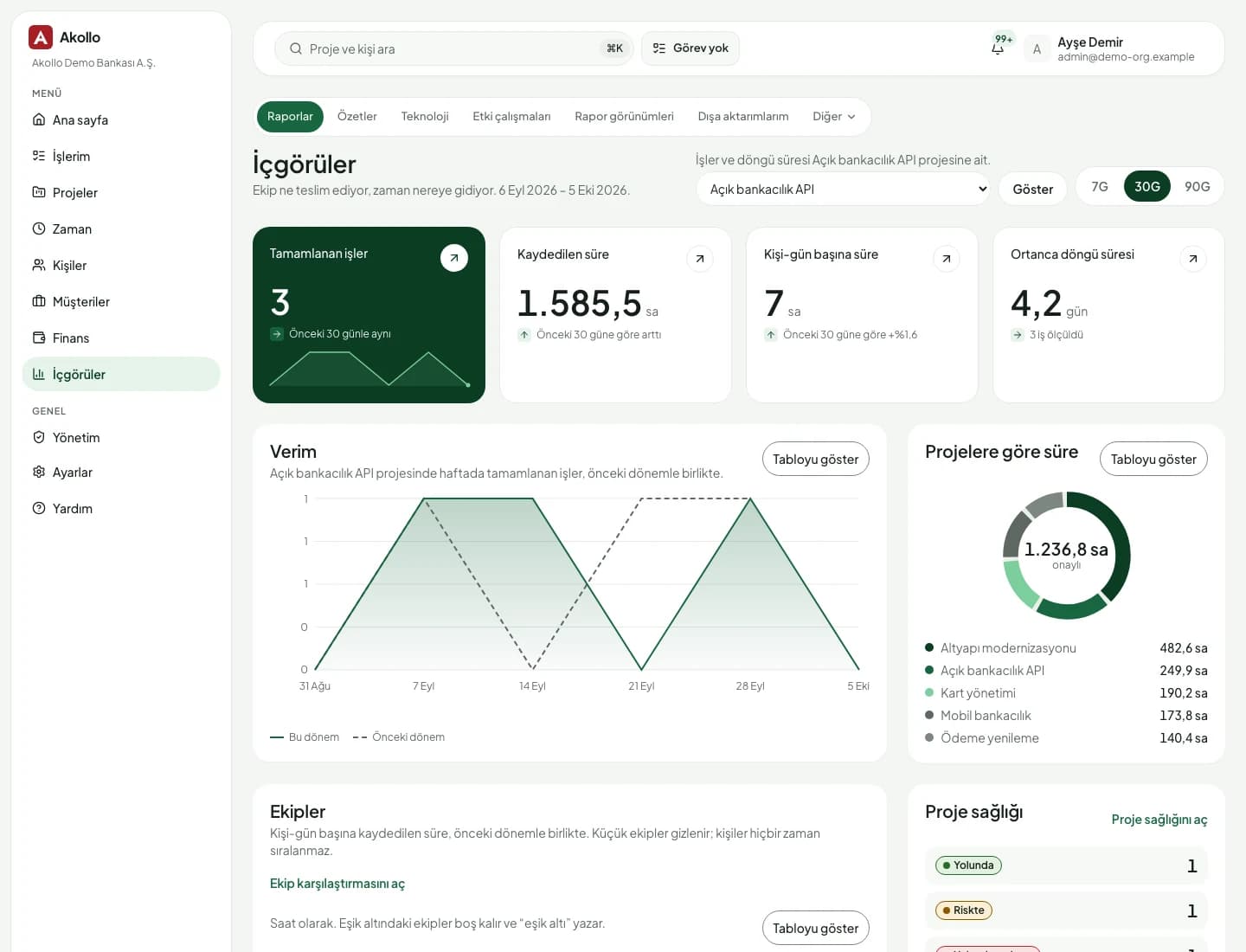
Akollo insights page with throughput and hours by project for a demo organisation

Delivery reports

Sprints, releases and risks in numbers

Active sprints show committed, completed, added and removed work with burndown and burnup charts, also as a table. Velocity appears once three sprints are closed, and risks are ranked by probability times impact.

  • Burndown and burnup, readable as a table
  • Velocity per sprint
  • Release notes as CSV
  • Status updates that can be corrected, never edited

Time reports and exports

One set of figures for managers, finance and BI

Time reports group any period by day, task, application, category or employee. People with the export permission create CSV or Excel files, and reporting publishes datasets your BI tool reads over the API or SQL.

  • Exports with state, row count and expiry
  • BI datasets read with an API key, page by page
  • SQL access for Power BI DirectQuery and live Tableau
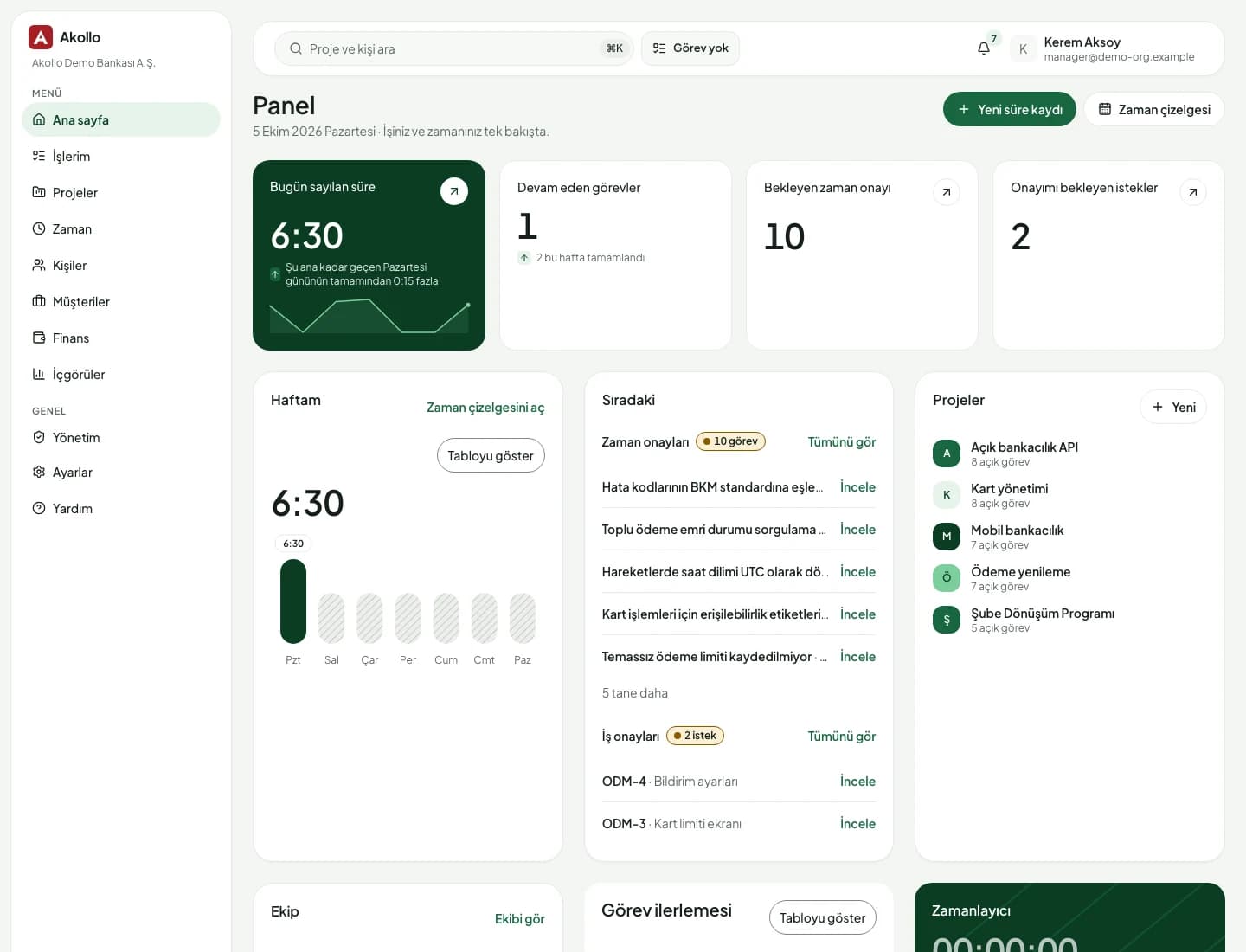
Akollo home dashboard with weekly hours, open tasks and pending approvals

AI on this module

Ask for the figure, then the table

Some answers arrive as a chart card. Show table lists every value behind it.

Every figure respects your scope. The assistant cannot show you a record you could not open.

From the daily view to the board pack

Reporting reads the records; it never changes them.

  • Insights page

    Throughput, cycle time and hours by project for the work you can see.

  • Time reports

    Credited, worked, overlapping and no-task time for any period, with filters.

  • Sprint reports

    Burndown, burnup and velocity from the boards your teams already use.

  • Status and risks

    On track, at risk or off track, and a scored risk register per project.

  • CSV and Excel exports

    Report files with a checked scope on every download and an expiry date.

  • BI datasets

    Agreed tables such as approved hours per person and day, over the public API.

  • SQL access for BI

    Read-only views over TLS for DirectQuery and live connections, approved by a second admin.

  • Ask in plain language

    Ask Akollo AI for a figure and get the sources it was read from.

How the modules connect

Every module reports here

Reports read projects, hours, people and budgets where they are kept, so a figure on a dashboard and the record behind it never disagree.

  1. 01Plan

    Turn goals into projects, backlogs, sprints and timelines.

  2. 02Staff

    Pick people by skills, availability and leave.

  3. 03Track

    Record time by hand or with the desktop app, on the right task.

  4. 04Bill

    See cost, budget, billing and margin per project and client.

  5. 05ImproveYou are here

    Read what happened and plan the next round better.

    • Reports & dashboards

The AI assistant works across every step, with your permissions and only after you confirm. AI assistant

Deployment and security

Runs where your data has to stay

The same Akollo in our cloud, in your own cloud or on your own servers.

  • Cloud or your own servers

    Choose where Akollo runs. Every module works the same way in each setup.

  • Your own AI model

    Point the assistant at a local model inside your network or at your own provider.

  • Scope in every view

    Managers see only the people in their scope, in every screen, report and export.

  • Audit records and four eyes

    Privilege and configuration changes are recorded, and sensitive ones wait for a second person.

Questions about Reports & dashboards

Can we use Power BI or Tableau?

Yes. Reporting publishes datasets that Power BI, Tableau, Looker Studio or a script read with an API key. For DirectQuery and live connections there is read-only SQL access to approved views.

Does a manager see everyone's figures?

No. Every report applies the reader's scope: a manager sees the people and projects they are allowed to see, and each export download checks that scope again. Time & timesheets applies the same rule.

Can a BI connection change data in Akollo?

No. Dataset keys and SQL logins are read-only. A key with only the dataset scope cannot read projects, tasks or people either.

Are there report templates for every area?

Time reports, the insights page and sprint reports carry real figures today. The Reports and Summaries pages list report types and layouts, and filling them with data is planned.

See your own numbers in Akollo

We set up a demo with your projects and the reports your leadership asks for, in English or Turkish.